
Strategy Preferences - Teaching Your Agent
Teaching Your Agent: The Power of Strategy Preferences
Imagine having a new customs specialist join your team. You wouldn't just hand them documents and say "figure it out." You'd teach them your organization's procedures, preferences, and how to handle common situations. Strategy preferences do exactly this for your agent - they're your way of teaching the AI how your organization likes to work.
Understanding Strategies and Preference Scoping
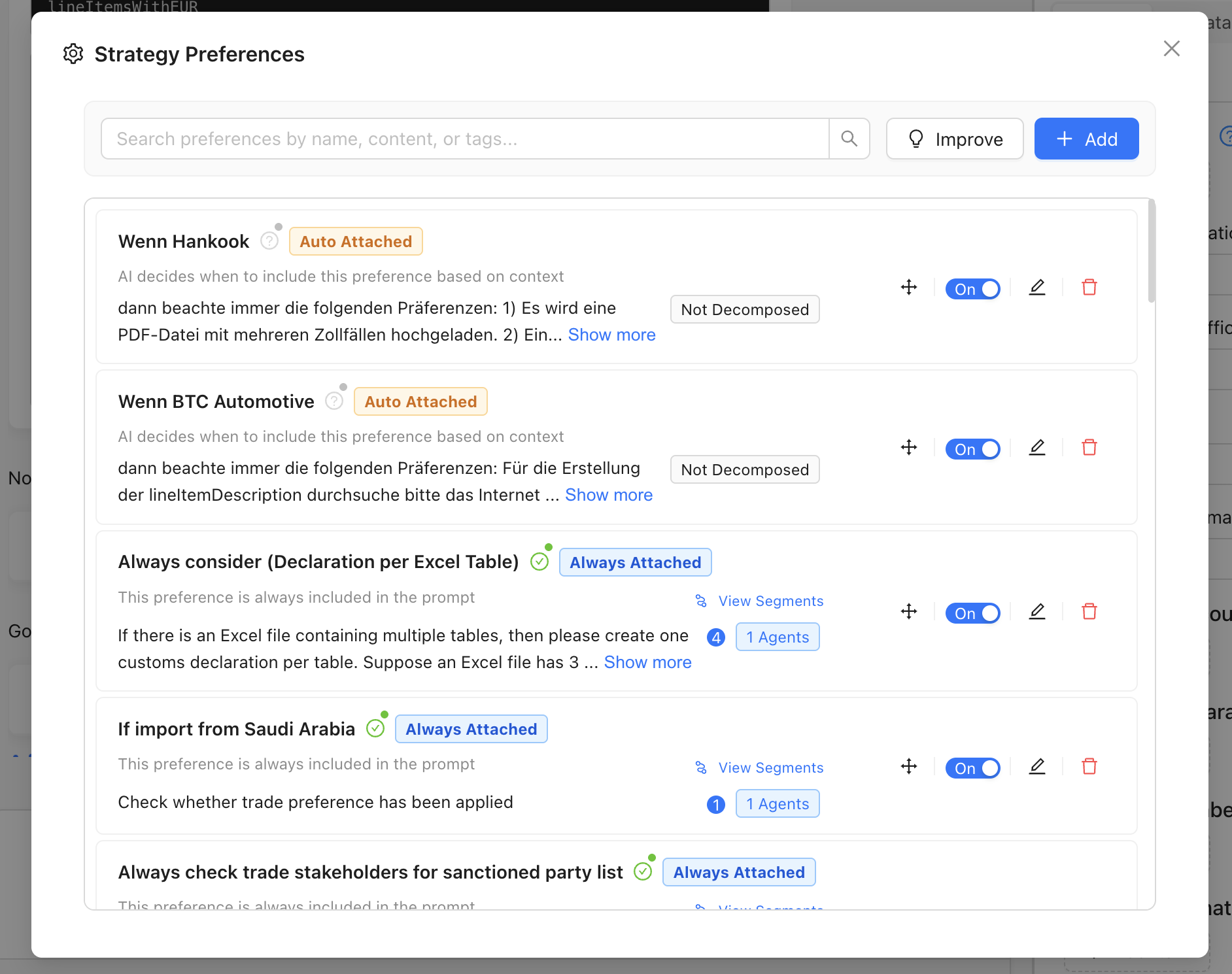
Above: The preferences management interface showing how strategies organize and scope your business rules.
Strategy-Based Organization
Preferences don't exist in isolation - they're organized within strategies that define specific operational contexts. This scoping ensures that your agent applies the right rules at the right time:
Separate Strategies for Different Operations:
- Import Strategy: Preferences specific to inbound shipments
- Export Strategy: Preferences specific to outbound shipments
- Transit Strategy: Preferences for goods in transit
- Regional Strategies: Country or region-specific preferences
Example of Strategy Separation:
IMPORT STRATEGY - "EU Electronics Imports"
- Default import office: DE123456 (Hamburg)
- Prioritize supplier invoices for valuation
- Apply conservative classification for dual-use items

EXPORT STRATEGY - "Global Electronics Exports"
- Default export office: DE789012 (Frankfurt)
- Use commercial invoices for export valuation
- Include detailed technical specifications for compliance
This separation ensures preferences never conflict between different operational contexts and allows for specialized handling based on your business flows.
Strategy Attachment Types: How Preferences Reach Your Agent
Understanding how preferences are delivered to your agent is crucial for optimal performance. There are three attachment types, each serving different strategic purposes:
1. Always Attached
When to Use: Core business rules that apply to every single case Behavior: Full preference content is provided to the agent every time Best For: Fundamental policies, critical compliance rules, universal data standards
Example:
Preference Name: "Standard Invoice Validation Rules"
Always Attached: YES

Content: All commercial invoices must include supplier tax ID,
complete buyer address, and itemized product descriptions.
If any element is missing, flag for manual review before processing.
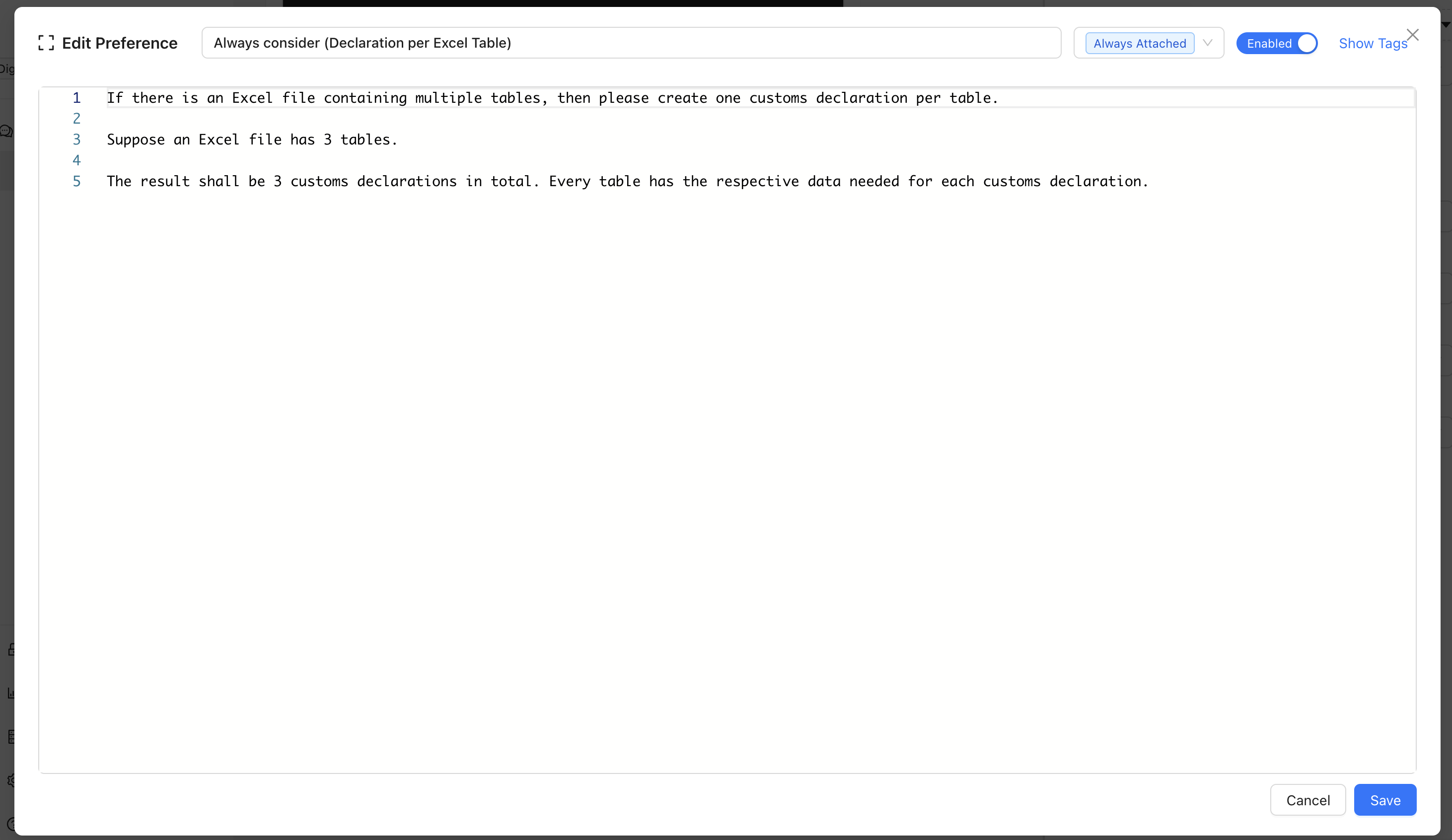
Above: Example of a real preference showing the always-attached setup that provides rules to the agent every time.
2. Auto Attached (Recommended)
When to Use: Context-dependent rules that should apply selectively Behavior: AI classifies relevance based on context and provides preference only when applicable Best For: Stakeholder-specific rules, country conditions, supplier-specific handling
Example:
Preference Name: "Germany Automotive Compliance - BMW Shipments"
Auto Attached: YES

Content: For shipments to BMW facilities in Germany, ensure
all automotive parts include IATF 16949 certification references
and VDA labeling compliance documentation.
Note: The preference name should clearly indicate conditions for auto-attachment. The AI uses this information to determine when the preference is relevant.
3. Agent Requested
When to Use: Specialized knowledge that the agent should actively seek when needed Behavior: Agent must make explicit tool call to retrieve preference content Best For: Complex technical procedures, rarely-used exception handling, detailed regulatory guidance
Example:
Preference Name: "Dangerous Goods Class 9 Lithium Battery Documentation"
Agent Requested: YES

Content: [Detailed 50+ line procedure for lithium battery classification,
UN3481 documentation requirements, and carrier-specific handling instructions]
Choosing the Right Attachment Type
Always Attached ← Use for rules that apply to >80% of cases Auto Attached ← Use for context-specific rules (recommended default) Agent Requested ← Use for specialized procedures accessed <20% of the time
What Are Strategy Preferences?
Strategy preferences are natural language instructions that tell the agent how to behave when it encounters common customs processing challenges. They're written in plain English, not code, making them accessible to anyone on your customs team.
Think of them as your organization's intelligent rulebook that handles:
- Missing Information: What to do when documents lack required data
- Inconsistent Data: How to resolve conflicts between different documents
- Standardization: How to format and normalize information
- Supplier Quirks: Special handling for suppliers with known data issues
- Quality Control: When to request human confirmation
Why Strategy Preferences Transform Your Operations
Without Preferences: Constant Manual Intervention
❌ Every time customs office is missing → Stop and ask user
❌ Every time product description varies → Manual formatting needed
❌ Every time supplier uses different format → Manual correction required
❌ Every conflicting document → Process halts for decision

Result: Agent becomes a sophisticated data entry tool requiring constant supervision
With Smart Preferences: Intelligent Automation
✅ Missing customs office → Auto-apply your standard routing rules
✅ Various product descriptions → Auto-normalize to your format
✅ Known supplier variations → Apply learned corrections automatically
✅ Document conflicts → Follow your priority hierarchy

Result: Agent becomes an intelligent partner that works independently using your expertise
Core Types of Strategy Preferences
1. Data Completion Rules
Handle missing information using your organization's knowledge and standards.
Example: Customs Office Selection
If export office is missing and shipper country is DE, use office DE123456.
If import destination is Austria and route includes Munich, prefer AT654321
for import office; otherwise use AT000000 as default.
Example: Country of Origin Logic
If country of origin is missing and HS code starts with 8471 (computers),
check supplier master data first. If supplier COO is unknown, leave blank
and request confirmation from procurement team.
2. Standardization and Normalization
Ensure consistent formatting and data quality across all processing.
Example: Product Description Standards
Rewrite all goods descriptions to follow pattern:
"<Commodity> - <Brand/Model> - <Key Specifications> - <Country of Origin>".
Remove marketing language like "premium quality" or "best-in-class".
Limit descriptions to 120 characters maximum.
Example: Address Formatting
Standardize all addresses to proper case (not ALL CAPS).
For German addresses, expand abbreviated state codes
(BY → Bavaria, NRW → North Rhine-Westphalia).
Ensure postal codes follow correct format for each country.
3. Supplier-Specific Rules
Handle known quirks and patterns from specific suppliers.
Example: Supplier Data Corrections
For supplier "ACME Electronics GmbH": If net weight is missing but
gross weight and unit count are provided, estimate net weight using
historical net-to-gross ratio for this product family. Include
confidence score and flag for review if confidence is below 80%.
Example: Supplier Document Priorities
For supplier "Global Manufacturing Ltd": If invoice and packing list
show different quantities, always prioritize packing list quantities
as they reflect actual shipment. Add note explaining the discrepancy.
4. Conflict Resolution
Establish clear hierarchies for handling inconsistent information.
Example: Document Priority Hierarchy
When Incoterms differ between documents, use this priority:
1. Signed purchase contract terms
2. Commercial invoice terms
3. Packing list terms
If all three conflict, draft email to procurement requesting clarification.
Example: Value Discrepancy Handling
If invoice total and packing list total differ by more than 5%,
prioritize invoice values but add comment noting discrepancy.
If difference exceeds 10%, flag for manual review before processing.
5. Quality Assurance and Escalation
Define when and how to involve human expertise.
Example: Confidence-Based Escalation
When tariff classification confidence score is below 85%,
add case comment with reasoning and mark for customs expert review.
For classifications with confidence below 60%, do not proceed
without explicit human approval.
Example: High-Value Transaction Review
For shipments valued over €50,000 or containing more than 100 line items,
generate summary report highlighting key values, tariff codes, and
any assumptions made. Email summary to compliance team before final processing.
Real-World Strategy Examples
Electronics Importer Strategy
CUSTOMS OFFICES:
- Export from China: Always use CN123456 unless specific port mentioned
- Import to Germany: Use DE789012 for Hamburg, DE345678 for Frankfurt
- If route unclear, default to DE000000 and request routing confirmation

PRODUCT DESCRIPTIONS:
- Pattern: "Electronics - <Brand> <Model> - <Key Feature> - <COO>"
- Remove marketing terms: "revolutionary", "cutting-edge", "premium"
- Include technical specs when available: memory, storage, connectivity

SUPPLIER RULES:
- Shenzhen Electronics Co: Always verify COO against master data (often incorrect)
- TechMax Trading: Use packing list weights (invoice weights unreliable)
- Global Components Ltd: Apply 15% markup for customs valuation (historical pattern)

COMPLIANCE:
- All shipments >€25,000: Check for CE marking requirements
- Lithium battery products: Verify UN3481 dangerous goods documentation
- WiFi devices: Confirm FCC/RED compliance certificates included
Automotive Parts Distributor Strategy
DATA COMPLETION:
- Missing part numbers: Extract from product description using pattern matching
- Unknown supplier addresses: Use master data primary address
- Missing COO for EU suppliers: Use supplier country unless otherwise documented

NORMALIZATION:
- Part descriptions: "<Part Category> - <OEM Part Number> - <Vehicle Application>"
- Supplier references: Standardize format "INV-YYYY-NNNNNN"
- Weights: Convert all to kilograms, round to 2 decimal places

QUALITY CONTROL:
- New suppliers: Require IATF 16949 certification verification
- High-value parts (>€1,000): Cross-check specifications with OEM data
- Safety-critical components: Mandatory dual-approval before processing
Writing Effective Preferences
Best Practices for Clear Instructions
✅ Be Specific and Actionable
Good: "If country of origin is missing for HS codes starting with 8471,
check supplier master data for historical COO. If no history exists,
leave blank and email procurement@company.com for confirmation."

❌ Vague: "Handle missing country of origin appropriately."
✅ Use Conditional Logic
Good: "If total value exceeds €10,000 AND contains electronics,
require CE marking documentation. If documentation missing,
flag for compliance review before proceeding."

❌ Unclear: "Check electronics compliance when needed."
✅ Define Clear Escalation Paths
Good: "When confidence in tariff classification is below 75%,
add detailed comment explaining uncertainty and assign case
to senior classifier queue for review within 24 hours."

❌ Unhelpful: "Get help when uncertain about classifications."
Common Preference Patterns
IF-THEN Logic
If [condition] then [action]. If [alternative condition] then [alternative action].
Priority Hierarchies
Prioritize [source A] over [source B] over [source C]. If all conflict, [escalation action].
Confidence-Based Actions
When [metric] is above/below [threshold], [action]. Include [additional information].
Supplier-Specific Patterns
For supplier "[name]": if [condition] then [specific action] because [business reason].
Getting Started with Strategy Preferences
Phase 1: Identify Your Most Common Challenges
Before writing preferences, observe your current manual processes:
- Document Analysis: What information is frequently missing?
- Manual Corrections: What do you always have to fix manually?
- Decision Points: What decisions do you make repeatedly?
- Quality Issues: What errors occur most often?
Phase 2: Start with High-Impact, Simple Rules
Week 1 Focus Areas:
✅ Customs office defaults for your main trade routes
✅ Standard product description formats
✅ Your most problematic supplier's data quirks
✅ Basic escalation rules for high-value shipments
Phase 3: Iterative Improvement
Strategy preferences evolve with your experience:
- Start Simple: Basic rules for common scenarios
- Monitor Results: Watch how preferences perform in real processing
- Refine Based on Results: Adjust thresholds, add exceptions, improve clarity
- Expand Gradually: Add more sophisticated rules as you gain confidence
Advanced Preference Techniques
Dynamic Rules Based on Context
If shipment is from supplier "Premium Electronics" AND destination
is automotive customer AND HS code starts with 8537, apply
conservative classification approach due to dual-use sensitivity.
Include detailed technical specifications in goods description.
Learning from Master Data
For products with established master data entries, use historical
tariff codes from master data when current classification confidence
is within 20% of historical patterns. Cross-reference supplier-product
combinations in master data for COO validation and weight estimates.
Flag significant deviations from master data patterns for expert review.
Note: The agent can only access structured master data that has been specifically configured for lookup - it cannot access arbitrary historical transaction data or perform complex data mining operations.
Seasonal and Temporal Rules
During Q4 holiday season (Oct-Dec), apply expedited processing
preferences: accept good-faith classifications above 80% confidence,
defer non-critical compliance checks to January review cycle.
Working with the Agent to Develop Preferences
The Agent as Your Preference Partner
The agent isn't just a user of your preferences - it's your intelligent partner in creating them:
Ask for Help Writing Preferences:
- "How should I write a preference to handle missing customs offices for shipments from China?"
- "Help me create a rule for standardizing product descriptions in electronics shipments"
- "What's the best way to phrase a preference for handling supplier ABC's incorrect COO data?"
Request Preference Optimization:
- "Can you suggest improvements to this preference based on how it performed?"
- "How can I make this rule more specific to reduce manual interventions?"
- "What additional conditions should I consider for this scenario?"
Get Preference Examples:
- "Show me examples of preferences for automotive parts suppliers"
- "What are common preference patterns for electronics importers?"
- "Help me understand how to structure escalation rules"
Collaborative Preference Development
You: "We often receive shipments where the supplier puts the wrong
country of origin. How should I handle this?"

Agent: "I can suggest a preference like this: 'For supplier XYZ Corp:
if declared COO is inconsistent with known manufacturing locations
in master data, override with master data COO and add comment
explaining correction. If no master data available, flag for
manual verification.'"

You: "That's good, but also check if the HS code makes sense with
the declared COO."

Agent: "Perfect! Here's the enhanced version: 'For supplier XYZ Corp:
if declared COO is inconsistent with known manufacturing locations
OR if COO-HS combination is uncommon (confidence <70%), override
with master data COO when available. Add comment explaining logic.
If no reliable master data, flag for procurement team review.'"
Measuring Preference Effectiveness
Key Performance Indicators
Automation Rate
- Percentage of cases processed without human intervention
- Target: >80% for routine shipments after 3 months
Data Quality Improvement
- Reduction in missing/incorrect fields
- Target: <5% manual corrections needed
Processing Speed
- Time from document upload to ready-for-submission
- Target: 75% reduction in processing time
Compliance Confidence
- Percentage of cases passing audit review
- Target: 95% audit success rate
Continuous Improvement Signals
Signs Your Preferences Are Working:
- Fewer interruptions for manual decisions
- More consistent data formatting across cases
- Faster processing times
- Higher user confidence in results
- Better audit performance
Signs to Refine Preferences:
- Frequent manual overrides of preference decisions
- Inconsistent results for similar scenarios
- Users avoiding agent processing for certain types
- Audit findings related to preference-driven decisions
Key Success Principles
- Start Simple, Evolve Gradually: Begin with basic rules and add complexity based on real experience
- Write for Humans: Preferences should be readable by your entire customs team
- Be Specific: Vague preferences lead to inconsistent results
- Include Business Context: Explain why rules exist to help the agent make better decisions
- Plan for Exceptions: Always define what happens when rules don't apply
- Measure and Refine: Use data to continuously improve preference effectiveness
- Choose Appropriate Attachment Types: Match attachment strategy to preference usage patterns
Looking Forward
Strategy preferences transform your agent from a sophisticated tool into an intelligent partner that understands your organization's unique approach to customs processing. They capture your institutional knowledge and apply it consistently across all operations.
In our next chapter, we'll explore advanced best practices and real-world success strategies that show how leading organizations combine preferences with other agent capabilities to achieve transformational results.
Remember: Your agent is ready to help you develop and refine these preferences. Don't hesitate to ask for guidance, examples, and optimization suggestions as you build your organization's intelligent customs processing strategy.