The Agent's Intelligent Tool Ecosystem
The Digicust Agent's power comes from its sophisticated toolkit - a collection of specialized tools that work together seamlessly to handle every aspect of customs operations. In this chapter, you'll understand how these tools transform your work from manual processing to intelligent automation.
Why Tools Matter: The Orchestra Analogy
Think of the agent as a conductor and the tools as orchestra musicians. Just as a conductor coordinates different instruments to create beautiful music, the agent orchestrates different tools to solve complex customs challenges:
- You provide the vision ("Process this shipment for import")
- The agent creates the strategy (analyze, validate, classify, integrate)
- The tools execute the work (each handling their specialized function)
- You receive the symphony (complete, accurate customs processing)
Tool Categories: Your Complete Automation Arsenal
🔍 Information Gathering Tools
These tools research and discover information from various sources:
Web Search Tool
What it does: Accesses real-time information from the internet using Google search When it's used:
- "What are the current EU import duties for smartphones?"
- "Find the latest Brexit customs procedures for automotive parts"
- "Search for documentation requirements for pharmaceutical imports to Canada"
Real Value: Keeps you current with ever-changing regulations and tariff rates without manual research.
Master Data Search Tool
What it does: Intelligently searches your organization's knowledge repository When it's used:
- Processing documents with known suppliers or products
- "Find all suppliers from Germany in our system"
- "Search for products with tariff code 8471"
Real Value: Leverages your accumulated organizational knowledge for consistent, informed decision-making.
🔧 Data Processing Tools
These tools analyze, transform, and manipulate data for customs operations:
JavaScript Execution Tool - The Powerhouse
What it does: Performs complex calculations and bulk operations in a secure environment When it's used:
- Processing large datasets (hundreds or thousands of items)
- Complex duty calculations with multiple rates
- "Calculate total customs value including all adjustments for this shipment"
- "Process all line items and standardize product descriptions"
Unique Capabilities:
- Bulk Processing: Handle 1,000+ line items in a single operation
- Complex Calculations: Multi-tier duty rates, currency conversions, statistical calculations
- AI Integration: Enhance product descriptions using AI
- Master Data Operations: Bulk create or update thousands of records
- Persistent Variables: Store information across multiple operations
Real Example: Processing an import declaration with 800 line items, validating tariff codes, calculating duties with anti-dumping rates, converting currencies, and updating master data - all in one operation.
Currency Conversion Tool
What it does: Provides real-time currency conversion with official exchange rates When it's used:
- Multi-currency invoices requiring customs value calculations
- "Convert this USD invoice to EUR using today's customs rate"
- "Calculate the duty value in local currency"
- Automatic conversion during document processing
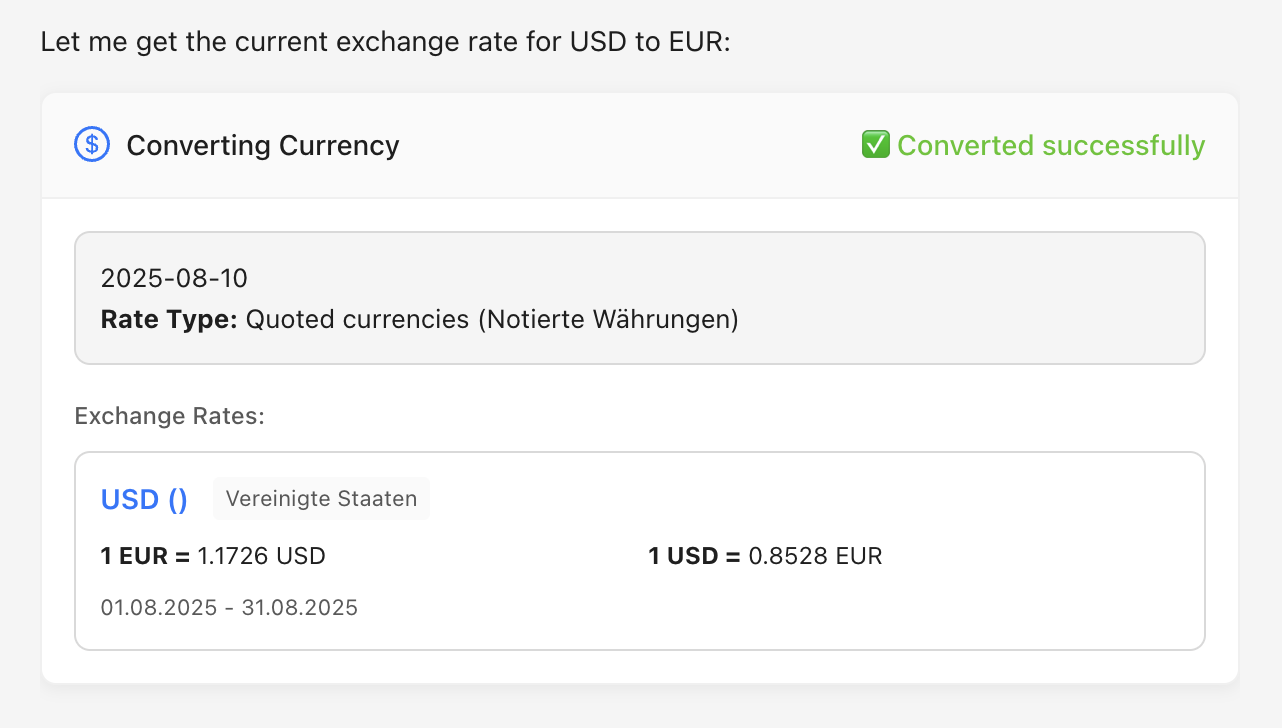
Above: The Currency Conversion Tool in action, handling real-time exchange rate calculations for customs valuations.
Key Features:
- Official Rates: Uses customs-approved exchange rates
- Historical Data: Access to past rates for backdated declarations
- Multi-Currency: Handle complex invoices with multiple currencies
- Automatic Integration: Seamlessly works with other processing tools
Document Reader Tool
What it does: Extracts and analyzes information from uploaded documents When it's used: Automatically when you upload any document File Formats Supported: PDF, Excel, Word, images, emails (.msg/.eml), CSV, ZIP archives
Advanced Features:
- OCR Technology: Reads handwritten text and complex layouts
- Multi-Language Support: Processes documents in various languages
- Table Recognition: Extracts structured data from complex tables
- Quality Validation: Provides confidence scores for extracted data
Master Data Update Tool
What it does: Creates and enhances your organizational master data When it's used:
- Processing documents with new suppliers or products
- "Update our supplier database with information from these registration documents"
- Bulk operations to improve data quality
Intelligence Features:
- Duplicate Detection: Prevents creating duplicate entries
- Data Standardization: Normalizes formats and naming conventions
- Relationship Mapping: Links suppliers to products to transactions
📊 Classification & Validation Tools
These tools determine classifications and validate customs data:
Tariff Classification Tool - AI-Powered Analysis
What it does: Determines correct HS codes using advanced AI analysis When it's used: Only when explicitly requested (cost-effective usage)
- "Classify this new smart home device for customs purposes"
- "What's the correct HS code for this industrial IoT sensor?"
Sophisticated Analysis:
- Multi-Option Results: Provides multiple classification possibilities with confidence scores
- Detailed Reasoning: Comprehensive explanation of classification decisions
- Regulatory Context: Incorporates customs regulations and precedents
- Complex Product Handling: Analyzes multi-function devices and emerging technologies
Customs Tariff Number Tool
What it does: Validates tariff codes against official databases When it's used: Automatically when processing documents with HS codes
- Bulk validation of hundreds of tariff codes
- Auto-correction of outdated or invalid codes
- Providing detailed code descriptions and requirements
🛡️ Compliance Tools
These tools ensure regulatory compliance and risk management:
Export Control Tool
What it does: Comprehensive export control screening When it's used:
- Processing export shipments
- "Screen this electronics shipment for export controls"
- "Check if this customer is on any sanctions lists"
Screening Capabilities:
- Dual-Use Controls: Military and strategic technology screening
- Sanctions Lists: Embargo and denied parties checking
- License Requirements: Determines if export licenses are needed
Number Validation Tool
What it does: Validates business identification numbers When it's used: Processing supplier or customer information
- VAT number verification across EU countries
- EORI number format validation
- Business registration number checking
🔗 Integration Tools
These tools connect with external systems and manage workflows:
Trigger Event Tool
What it does: Executes integrations and workflow events When it's used:
- "Send this declaration to Dakosy"
- "Generate the dbh export file"
- "Email the mapping file to our customs broker"
Integration Capabilities:
- External Systems: Dakosy, dbh, Scope, AEB, e2open, ITMS connections
- File Generation: Creates mapping files and export formats
- Email Delivery: Professional correspondence with attachments
- Workflow Automation: Multi-step business process execution
How Tools Work Together: Intelligent Orchestration
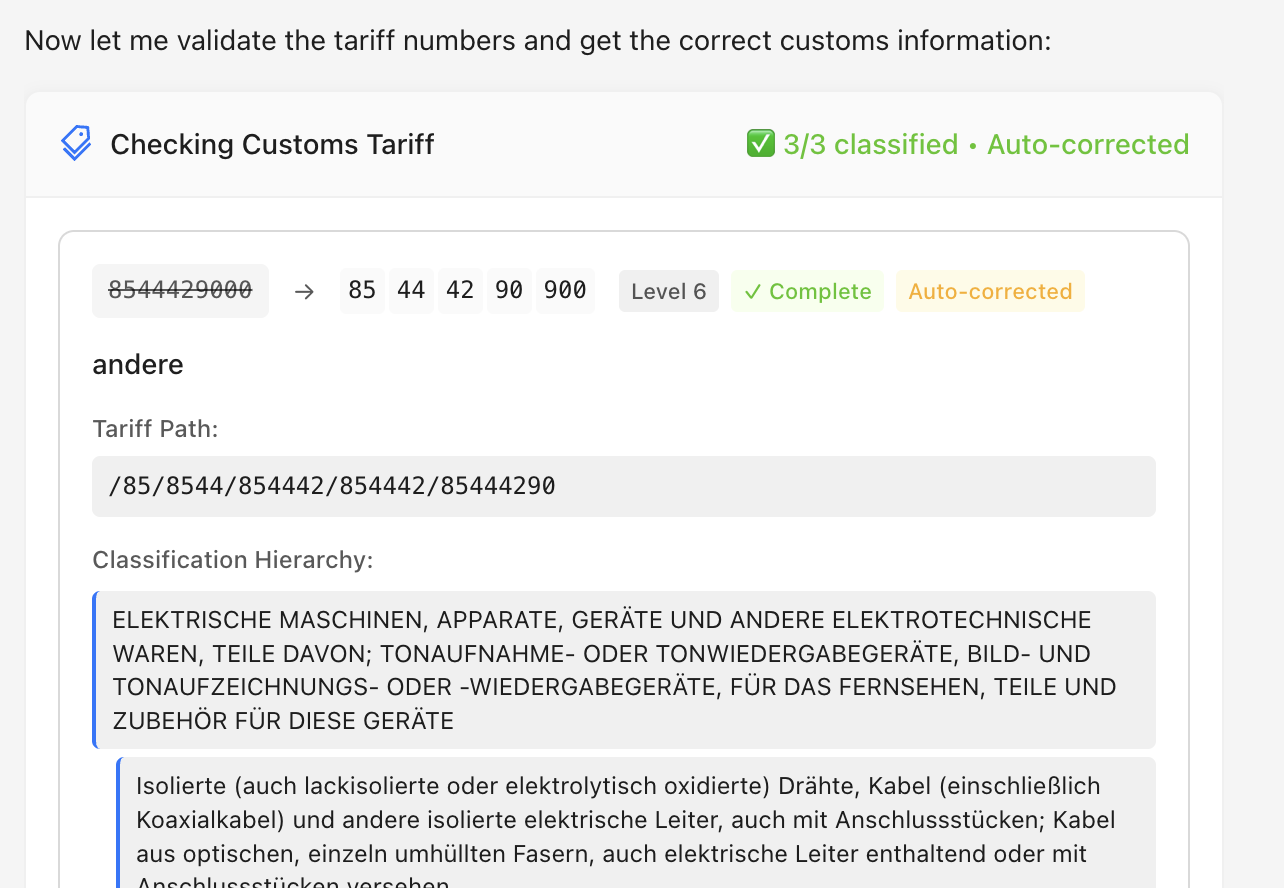
Above: The Tariff Number Tool checking and validating HS codes with detailed analysis.
Automatic Tool Selection
The agent's intelligence lies in selecting the right combination of tools automatically:
Your Request: "Process this invoice and create an import declaration"

Agent's Tool Orchestration:
1. Document Reader → Extract invoice data
2. Master Data Search → Find existing supplier info
3. Customs Tariff Tool → Validate all HS codes
4. Web Search → Check current duty rates
5. JavaScript Execution → Calculate totals and duties
6. Master Data Update → Enhance supplier info
7. Case Information → Update with processed data
8. Trigger Event → Generate final declaration
Sequential Processing
Tools build on each other's results:
- Document Reader extracts raw data
- Master Data Search enriches with organizational knowledge
- Web Search adds current regulatory context
- JavaScript Execution processes and transforms everything
- Validation Tools ensure accuracy and compliance
- Integration Tools deliver final results
Parallel Operations
The agent can use multiple tools simultaneously:
- Search web and master data concurrently
- Validate multiple data elements in parallel
- Process different document types simultaneously
Advanced Tool Features
Rate Limit Management
Tools have usage limits to ensure optimal performance:
| Tool Type | Daily Limit | Purpose |
|---|---|---|
| Tariff Lookups | 50 calls | Balance cost and functionality |
| Master Data Search | 100 calls | Optimize database performance |
| Master Data Updates | 25 calls | Maintain data quality |
| LLM Calls (JavaScript) | 1000 calls | Enable AI-powered processing |
Smart Management: The agent automatically monitors limits and optimizes usage patterns.
Error Handling & Resilience
Every tool includes robust error handling:
- Automatic Retries: For transient failures
- Graceful Degradation: Continue working when services are limited
- Clear Error Messages: Actionable feedback for resolution
- Fallback Options: Alternative approaches when primary methods fail
Quality Assurance
Tools provide confidence scoring and validation:
- Confidence Levels: For extracted data and classifications
- Cross-Validation: Between multiple information sources
- Business Rules: Automated compliance checking
- Manual Review Flags: For uncertain or high-risk results
Efficient Processing
Smart tool usage is key to maximizing both speed and cost-effectiveness when working with the agent. Some tools require more compute power and therefore incur higher costs and longer processing times. Understanding how to optimize your approach can significantly improve both performance and efficiency.
Cost and Performance Optimization
When working with the agent, keep these optimization strategies in mind:
Minimize Tool Calls
- Use single comprehensive requests instead of breaking down tasks into multiple small tool calls
- For bulk operations, process multiple line items in one request rather than making separate calls for each item
- Example: Instead of "Check HS code for item 1", then "Check HS code for item 2", use "Check HS codes for all items in this shipment"
Strategic Tariff Classification Usage
The Tariff Classification Tool is extremely powerful but resource-intensive. Use it strategically:
- Use it when truly needed: Only invoke this tool when you encounter genuinely complex or ambiguous classification scenarios
- Try alternatives first: Often, the agent's built-in knowledge, master data searches, or web searches can provide sufficient guidance for straightforward classifications
- Leverage AI intuition: The underlying AI model has extensive knowledge of HS codes and can often provide accurate classifications without expensive tool calls
- Validate instead of classify: Use the Customs Tariff Number Tool to validate suspected codes rather than running full AI classification analysis
Example Approach:
- First ask: "What HS code would likely apply to this smartphone case?"
- Then validate: "Please confirm this HS code 42029291 is correct for smartphone cases"
- Only use full classification if the initial approach yields uncertainty
Document Upload Optimization
- Upload only necessary documents: Avoid uploading entire folders or irrelevant files
- Focus on relevant content: When you have multiple documents, specify which ones contain the key information needed
- Combine related uploads: If processing multiple related shipments, handle them together rather than separately
Best Practices for Efficiency
- Batch Similar Operations: Group related tasks together in a single request
- Provide Clear Context: The more context you provide upfront, the fewer clarifying tool calls needed
- Use Existing Master Data: Leverage previously processed information to reduce repeated lookups
- Trust AI Knowledge: For common scenarios, rely on the agent's existing knowledge before invoking specialized tools
When to Use Premium Tools
Reserve resource-intensive tools for scenarios where their unique capabilities are essential:
- Tariff Classification: Complex, multi-functional products or emerging technologies
- Advanced Processing: Large datasets requiring specialized calculations
- Deep Research: Regulatory analysis requiring comprehensive legal text review
By following these efficient processing practices, you'll achieve faster results while optimizing costs, making your customs operations both more effective and more economical.
Practical Tool Selection Guide
For Document Processing
- Start with Document Reader (automatic)
- Use Master Data Search to find existing entities
- Apply Master Data Update for new information
- JavaScript Execution for complex transformations
For Classification Tasks
- Web Search for current information and precedents
- BTI Search for existing binding decisions
- Tariff Classification for complex AI-powered analysis
- Customs Tariff Tool for validation and details
For Compliance Checking
- Export Control Tool for dual-use and sanctions screening
- Web Search for current regulatory requirements
- Number Validation for business registrations
- Master Data Search for compliance history
For System Integration
- JavaScript Execution for data preparation
- Trigger Event Tool for system connections
- Email Generation for notifications
- File Creation for data exchange
Best Practices for Tool Usage
The Agent as Your Knowledgeable Partner
One of the most powerful aspects of the Digicust Agent is its deep self-awareness about its own capabilities and tools. The agent understands exactly what it can and cannot do, and it's designed to be your expert guide.
You can ask the agent directly about:
- "What's the best way to handle this type of task?"
- "What tools would you use for this scenario and why?"
- "How should I optimize this process for better efficiency?"
- "What are your capabilities for processing this type of document?"
- "Can you explain why you chose these specific tools?"
The agent will provide clear, honest assessments of its abilities and recommend the most effective approaches for your specific needs. This transparency helps you work together more effectively and makes better use of available tools.
✅ Do This
- Describe your goal, not the tools needed
- Ask the agent for guidance on best approaches and capabilities
- Provide context about business requirements
- Trust the agent's tool selection expertise and explanations
- Request process explanations when you want to understand the workflow
- Engage in dialogue about optimization and efficiency
❌ Avoid This
- Specifying which tools to use
- Micro-managing the process
- Interrupting complex operations
- Making assumptions about tool capabilities
- Avoiding direct questions about the agent's abilities
Key Takeaways
- Intelligence, Not Configuration: The agent's power lies in intelligent tool orchestration, not manual tool selection
- Self-Aware Partner: The agent understands its own capabilities deeply and can guide you on best practices - ask it directly about how to optimize your work
- Comprehensive Coverage: Every aspect of customs operations has specialized tool support
- Seamless Integration: Tools work together automatically to solve complex challenges
- Cost-Effective: Smart usage patterns and strategic tool selection maximize value while minimizing costs
The Digicust Agent's tool ecosystem transforms customs processing from manual, error-prone work into intelligent, automated workflows. By understanding how these tools work together, you can leverage their full power to revolutionize your customs operations.
In the next chapter, we'll learn about strategy preferences - how to teach the agent your organization's specific approaches and rules. Then we'll dive into advanced best practices and real-world use cases that show how to maximize the value of this powerful system.